Jump to HeaderJump to Main ContentJump to Footer
Michigan State University
College of Education
  • Strategic Plan
  • Resources
  • People Directory
  • Alums
  • Contact
  • Give

College of Education

  • About
    • Mission & History
    • Strategic Plan
    • Points of Distinction
    • Leadership
    • Academic Departments, Centers, Institutes & Offices
    • Faculty and Staff Directory
    • Inclusion & Diversity
    • Outreach Efforts
    • Buildings & Facilities
    • Career Opportunities
    • Ways to Give
    Dean Jerlando Jackson stands in front of a sign that reads Michigan State University.

    Meet Dean Jackson

    Meet Dean Jerlando F. L. Jackson
  • |
  • Academics
    • Majors & Degree-Granting Programs
    • Undergraduate Programs
    • Master's Studies
    • Doctoral Studies
    • Online Studies
    • Graduate Certificates & Specializations
    • Undergraduate Student Support
    • Graduate Student Support
    • Assistantships
    • Scholarships
    • Accreditation
  • |
  • Certifications
    • Become Certified or Add an Endorsement
    • School Psychologist Certification
    • Student Affairs Office
    • MSU Academic Programs Catalog
    • MSU Office of Accreditation, Assessment, Curriculum & Compliance
    Individual bikes on MSU's campus

    Educator Preparation & Accreditation

    Explore our efforts
  • |
  • Research
    • Office of Research Administration
    • Centers & Institutes
    • Student Research Opportunities
    • Research & Award News
    • Faculty Directory
    Aerial view of a driver in a race car

    Cooler, safer race car tech via MSU study

    Read about our research
  • |
  • Outreach
    • Policy
    • K-12 Schools & Districts
    • Urban Areas
    • International Areas
    • Alumni
    • Institute for the Study of Youth Sports
    • Office of Access & Community Engagement
    • Office of International Studies in Education
    • Office of K-12 Outreach
    • All Offices, Centers & Institutes
    oise

    40+ years of the Office of International Studies

    Explore our impact
  • |
  • News & Events
    • News
    • New Educator Magazine
    • Subscribe: ReviewED Newsletter
    • Events Listing
    Ann Austin poses for the camera in front of a bookshelf

    Celebrating: Ann E. Austin

    Austin named Fellow of American Association for the Advancement of Science
College of Education
  • About
  • Academics
  • Certifications
  • Research
  • Outreach
  • News & Events

< About

  • Mission & History
  • Strategic Plan
  • Points of Distinction
  • Leadership
  • Academic Departments, Centers, Institutes & Offices
  • Faculty and Staff Directory
  • Inclusion & Diversity
  • Outreach Efforts
  • Buildings & Facilities
  • Career Opportunities
  • Ways to Give
Dean Jerlando Jackson stands in front of a sign that reads Michigan State University.

Meet Dean Jackson

Meet Dean Jerlando F. L. Jackson

< Academics

  • Majors & Degree-Granting Programs
  • Undergraduate Programs
  • Master's Studies
  • Doctoral Studies
  • Online Studies
  • Graduate Certificates & Specializations
  • Undergraduate Student Support
  • Graduate Student Support
  • Assistantships
  • Scholarships
  • Accreditation

< Certifications

  • Become Certified or Add an Endorsement
  • School Psychologist Certification
  • Student Affairs Office
  • MSU Academic Programs Catalog
  • MSU Office of Accreditation, Assessment, Curriculum & Compliance
Individual bikes on MSU's campus

Educator Preparation & Accreditation

Explore our efforts

< Research

  • Office of Research Administration
  • Centers & Institutes
  • Student Research Opportunities
  • Research & Award News
  • Faculty Directory
Aerial view of a driver in a race car

Cooler, safer race car tech via MSU study

Read about our research

< Outreach

  • Policy
  • K-12 Schools & Districts
  • Urban Areas
  • International Areas
  • Alumni
  • Institute for the Study of Youth Sports
  • Office of Access & Community Engagement
  • Office of International Studies in Education
  • Office of K-12 Outreach
  • All Offices, Centers & Institutes
oise

40+ years of the Office of International Studies

Explore our impact

< News & Events

  • News
  • New Educator Magazine
  • Subscribe: ReviewED Newsletter
  • Events Listing
Ann Austin poses for the camera in front of a bookshelf

Celebrating: Ann E. Austin

Austin named Fellow of American Association for the Advancement of Science
  • Strategic Plan
  • Resources
  • People Directory
  • Alums
  • Contact
  • Give

Jan. 17, 2018

&#8220;Blank canvas:&#8221; Classroom tech product introduced to K-12 for the first time

Summary

A collaboration led by a Michigan State University researcher is bringing an innovative touchscreen technology into K-12 classrooms for the first time. Professor Douglas Hartman is helping to introduce a teaching and learning tool that blends smartboards, tablets and laptops with 21st century learning. The large digital touchscreen—called a workspace, and created by Prysm, Inc., an international technology company—has… Read More »
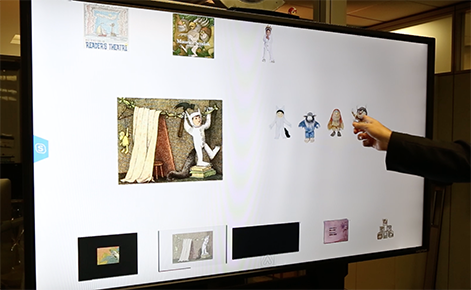
A collaboration led by a Michigan State University researcher is bringing an innovative touchscreen technology into K-12 classrooms for the first time.

The Prysm technology touchscreen in action.

Professor Douglas Hartman is helping to introduce a teaching and learning tool that blends smartboards, tablets and laptops with 21st century learning. The large digital touchscreen—called a workspace, and created by Prysm, Inc., an international technology company—has unique classroom capabilities. For example, teachers can upload different types of content from a book (i.e., character images, videos, text excerpts or book pages, see below image) and utilize the functions to help increase learning opportunities. Educators can also write on the screen, rearrange elements or connect with communications services, such as Skype. 

The Prysm workspace is being tested in two classrooms in Michigan’s North Branch Area Schools (NBAS).  
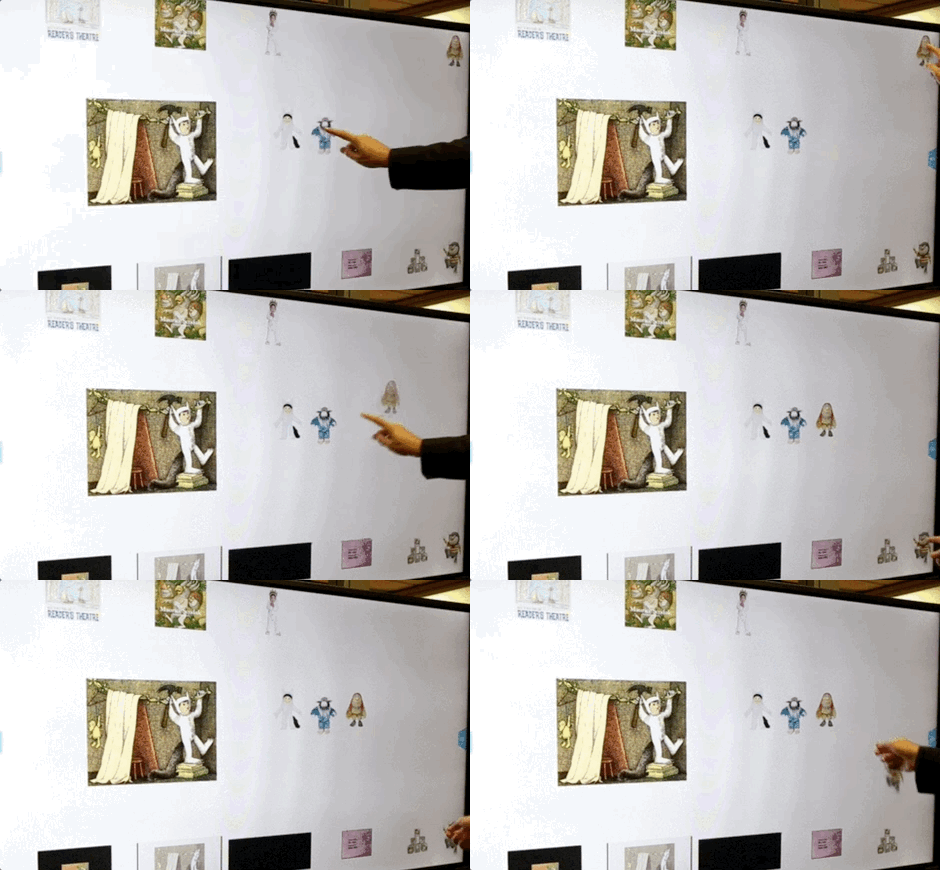
Professor Doug Hartman showcases some of the uses of the touchscreen.

Professor Doug Hartman showcases some of the uses of the touchscreen.

“It has potential far beyond smartboards,” said Hartman, who holds a joint appointment in the departments of Teacher Education and Counseling, Educational Psychology and Special Education. Educators and students alike are able to have multiple applications open, engage with educational games and more—all without opening and closing apps or toggling among windows. 

The classroom opportunities and skilled teachers at NBAS were an ideal pair for a yearlong exploration into how such technology can impact learning, said Hartman. He has been working with the district for nearly 10 years to help make technology use in classrooms more teacher-designed and needs-based—something the Prysm technology will help grow.

Doug Hartman

Professor Doug Hartman

“We see the Prysm digital workspace as another tool that can provide remarkable possibilities for teaching and learning. It’s a blank canvas where teachers and students can design personalized learning,” added Hartman, who teaches courses on technology in the classroom for the Master of Arts in Teaching & Curriculum program.

“Work Smarter Together”

“This is the first engagement of the Prysm technology in a K-12 school,” said Brandon Fischer, vice president for research and development at Prysm. The company, with headquarters in California’s Silicon Valley, has long focused on creating digital products to make collaborating easier across disciplines, including sales, media and entertainment.

When the opportunity arose to work with MSU and bridge the gap into education, company leaders and university scholars agreed: There was “tremendous growth potential” for education and the company alike. Prysm loaned both screens to MSU and NBAS through summer 2018 to explore the idea.

Ever since, Fischer has been working closely with Hartman and educators in North Branch to ensure the screens are a perfect fit—and adapting them along the way. 

“It’s an opportunity of joint exploration,” he continued. “Collaboratively, we’re looking at the platform to see how it can add value today, how to better engage students and what tweaks we can make to continue to add value, whether it is in a third grade classroom or higher education setting.”

The project aims to answer a series of questions in research and development, including:

  • What are the learning progressions for the school community as they integrate the technology?
  • What types of support are needed for the community to become fluent in its uses?
  • What are the effects on teacher development, student learning and administrator effectiveness?
  • What innovative uses are developed as teachers, students and school administrators experiment with and experience the affordances and constraints of the technology?

To answer these questions, Hartman, along with Professor John Bell and MSU doctoral students, are examining the teaching and learning capabilities of the workspace through the Design Studio at MSU. During the yearlong collaboration, they hope to better define how digital touchscreen and communication technologies can be integrated into teaching, learning and leading for teachers, students and administrators.

The NBAS classrooms are serving as a case study; MSU scholars are leading the research and development of the entire process.
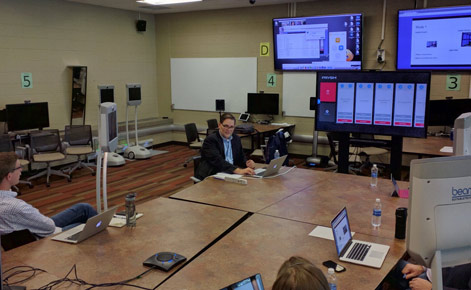
Prysm created a video to explore more about the new technology.

Prysm, Inc. created a video to explore more about the new technology. Watch now.


Teaching with tech

Two elementary classrooms at NBAS were selected to participate in fall 2017. It didn’t take the teachers long to find a wide variety of uses and benefits of the screens—in and out of the classroom.

During class time, students are able to interact directly with the large touchscreen or use wireless school-issued tablets and laptops to connect to the screen. Teachers are able to experiment with new teaching methodologies.

The benefits of blending many digital technologies continues at home: Students and teachers are able to log in and connect to the screen’s capabilities from almost any device. This gives educators the ability to design lessons outside of the physical classroom, and gives students opportunities to engage with project work and lessons from anywhere.

With several months of utilizing the screen under her belt, third-grade teacher Kim Gormley says it is making learning more enjoyable.

“I’m having so much fun teaching with this technology,” she said. “I love seeing the excitement in the students’ faces when they are working with the technology.”

Gormley uses it in all areas with her elementary class. She’s led discussions of chapter books on the large screen, compared informational videos, modeled mathematical problem solving, facilitated an interactive activity, synthesized media sources on complex topics and much more. 

Users can create drawings utilizing the technology.


Related links

WNEM featured some of the North Branch Area Schools students as they utilized the Prysm technology in the classroom. See how they created their own newscast.

Programs

  • Undergraduate Programs
  • Master's Programs
  • Doctoral Programs
  • Online Programs

Academic Departments

  • Counseling, Educational Psychology & Special Education
  • Educational Administration
  • Kinesiology
  • Teacher Education

For Students

  • Graduate Support
  • Undergraduate Support
  • Scholarships
  • Assistantships

For Faculty & Staff

  • Communications
  • Data & Analytics
  • Human Resources
  • Policies, Committees & More
  • Tech Services

Our College

  • Office of the Dean
  • Imagin[ED] 2030 Strategic Plan
  • Mission
  • Directory
  • Centers & Institutes
  • Accolades & Awards
  • Rankings
  • Subscribe to our Newsletter
  • "New Educator" Magazine
  • News
  • Jobs

Contact us

(517) 355-1734

Address

Michigan State University College of Education 620 Farm Lane East Lansing, MI 48824

Releases and Statements

Follow Us

  • Visit our Facebook page
  • Visit our page on X
  • Visit our Instagram page
  • Visit our LinkedIn page
  • Visit our YouTube page

If you're having accessibility issues, please let us know.

Know More: Campus Safety Information and ResourcesTransparency Reporting: Budget & Salary/Compensation
  • Contact Information|
  • Site Map|
  • Privacy Statement|
  • Site Accessibility|
  • Call MSU: (517) 355-1855|
  • Visit: msu.edu|
  • Notice of Nondiscrimination|

SPARTANS WILL|© Michigan State University|